


Automatic Litter Box Troubleshooting and Maintenance Guide
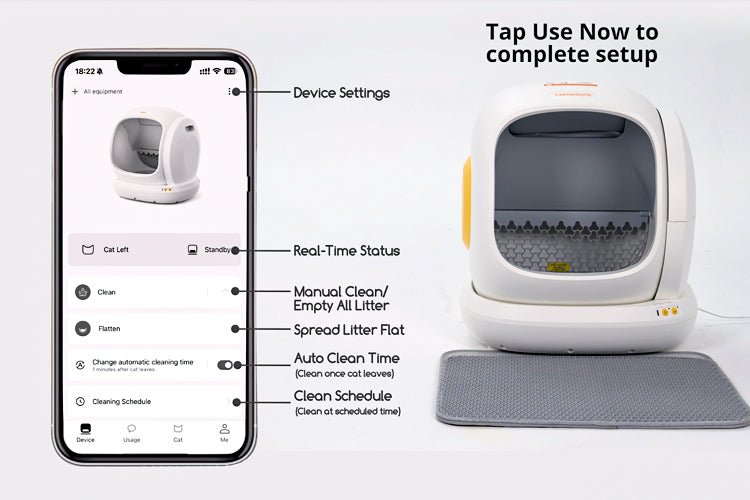
When an automatic litter box stops working, the cause is usually one of four things: a part that is out of place (side cover, drum or waste drawer), a blocked or confused sensor, litter that is the wrong type or at the wrong level, or a power or Wi-Fi problem. Unplug the unit, check those four in order, and most boxes are running again within a few minutes without tools or a service call.
This guide starts with that quick check, then explains what the indicator lights mean on Meowant SC09 and SC10 boxes and works through each common fault. The second half covers the routine care that prevents most of these problems in the first place: emptying the waste drawer, fitting liners, deep cleaning, noise and how to keep the machine running for years.
Automatic litter box care guides in this series
Each guide below goes deeper on one problem. The sections further down this page give you the short answer first.
Fixing faults and error signs
- What to do if a Meowant SC10 stops turning mid-cycle: how to read the display code, then check the side covers, drum and infrared sensor in a safe order.
- Why an SC10 starts by itself or keeps pausing: how to tell a delayed or scheduled cycle apart from a sensor or cover problem.
- How sensors work in self-cleaning litter boxes: what the presence, weight and position sensors do during a cycle, and the usual causes of false alarms.
- Common mistakes with a self-cleaning litter box: setup, litter and placement habits that cause most early problems.
- How loud is too loud?: what normal running noise sounds like, and how to help a cat that is startled by the cycle.
Cleaning and routine maintenance
- Deep cleaning an automatic litter box: which parts you can wash, which you only wipe, and a step-by-step order that keeps sensors dry.
- How often to change the litter in a self-cleaning box: what affects the interval, and how to do a full change without upsetting your cat.
- A 5-minute monthly maintenance routine: a short checklist for the drawer, liner and litter that heads off lingering odor.
- Using app alerts to stay ahead of odor: how drawer reminders and a steady emptying routine stop smells from building between cleanouts.
- How long self-cleaning litter boxes last: what wears out first, and the habits that add years to the machine.
Waste drawer and liners
- How often to empty the waste drawer: a starting schedule by number of cats, and the signs that mean it is time to empty early.
- Drawer says full when it isn't?: the safe order for clearing a false full warning, from liner fit to sensor cleaning.
- Choosing waste drawer capacity: how drawer size, cat count and your preferred cleanout interval fit together.
- Preventing liner tears: how to fit a liner so it stays intact and keeps odor sealed in the drawer.
- What to do when you run out of Meowant liners: how to use a temporary substitute safely until your replacements arrive.
Quick troubleshooting checklist
Start here before you try anything more involved. Unplug the box first whenever you reach inside, and keep your cat out of the room while you work.
| What to check | Why it matters |
|---|---|
| Power: outlet, the original adapter and the plug at the base | Rules out the simplest cause of a dead or restarting unit |
| Side cover, drum and waste drawer fully seated | The SC09 and SC10 stop with a warning light if any of these is out of place |
| Sensor areas free of dust, litter and fur | Prevents false cat-detected readings and stalled cycles |
| Litter between the MIN and MAX fill lines | Too much causes overflow and jams; too little leaves waste stuck to the liner |
| Box on a firm, level floor, with no mat underneath | Soft or uneven flooring can confuse weight-based detection |
| Waste drawer emptied and deodorizer checked | A full drawer or spent deodorizer is the usual cause of odor after cleaning |
| Phone on a 2.4GHz Wi-Fi network, Bluetooth on | Meowant's Wi-Fi boxes, such as the SC09, connect on 2.4GHz only |
If the box still misbehaves after these checks, match the indicator light to your model below, then go to the section for the specific fault.
What the indicator lights mean on Meowant SC09 and SC10
A red light on a Meowant self-cleaning litter box means the unit has stopped or paused and is waiting for you to fix something: a cover or drum out of place, a blocked sensor or a cat stepping in mid-cycle. The meanings differ by model, so check which box you have.
Meowant SC09 status lights
These patterns come from the user manual for the Meowant SC09 (MW-SC09).
| Light pattern | What it means | What to do |
|---|---|---|
| Solid red | Side cover not in place | Align the side cover and insert it back into the base support. |
| Solid red, button lights flashing | Drum not in place, or motor stall | Unplug, remove the drum, clear anything stuck at the rotating shaft, reseat and lock the drum, then reconnect. |
| Solid red, one button light flashing | Cleaning, emptying or spreading paused | Press that button once to carry on. |
| Solid red, one button light on | Cat or weight detected during a cycle | Wait. The drum resumes once the cat leaves or the weight is removed. |
| Solid green | Cat or weight detected while the drum is still | Normal. If no cat is inside, check for litter or an object resting on the box. |
| Flashing green / two green flashes | Drum returning to Home position / child lock turned on or off | Normal operation. |
| Solid blue / flashing blue | Ready and connected / setting up Wi-Fi | Normal operation. |
If the buttons do nothing, child lock may be on. On the SC09 you turn it on or off by holding the spread button for 3 seconds.
Meowant SC10 error codes
The Meowant SC10 (MW-SC10) shows four error codes on its control panel.
| Light pattern | Code and meaning | What to do |
|---|---|---|
| Waste drawer icon flashing red | E1: infrared sensor blocked | Unplug, remove the drum, clear dust or litter from the sensor, and empty the drawer if it is full. |
| Drum icon flashing orange | E2: side cover not in place | Refit both side covers and slide them to OFF to lock the drum. |
| Paw icon flashing red | E3: motor error | Unplug, remove the drum and clear anything stuck at the rotating shaft, then reconnect. |
| Drum icon flashing red | E4: drum not in place | Reseat the drum on the base and lock both side covers. |
A solid white waste drawer icon simply means the drawer is full. For a step-by-step walk-through of these codes, see what to do if your SC10 stops turning mid-cycle.
How to reset a Meowant litter box
Most faults clear once the cause is fixed and the box is unplugged and reconnected. After you plug it back in, the drum turns a full circle and returns to Home before it is ready. The SC09 also has a full factory reset: hold the clean and spread buttons together for 5 seconds. You will need to pair the box with the app again afterwards, so use it only when a normal power cycle has not helped.
For SC01, SC02 and SC03 boxes, or if you have lost your paper manual, every Meowant manual is on the Meowant user manual page. If the same red light keeps coming back after you have checked the parts it points to, contact Meowant support rather than opening the base.
1. What to do when the litter box sensor fails
Sensors are the litter box's safety switch. When they misread, the unit may sit idle, flash a warning light or refuse to start a cycle. The usual culprits are simple: dust and fur on the sensor, a box that was knocked or moved, or a soft or uneven floor.
Quick fixes
- Unplug, then clean the sensor area. Wipe it with a dry, soft cloth. Don't spray cleaner into sensor openings.
- Check the floor. The SC09 and SC10 manuals ask for a firm, level surface with at least 3 inches of clearance from the wall. Put the litter mat in front of the box, never partly or fully under it.
- Look for things resting on the box. A towel, toy or another pet leaning on the unit can register as a cat.
- Power cycle. Reconnect and let the drum return to Home before testing.
On the SC09, a solid green light with no cat inside usually means something is adding weight. On the SC10, E1 points to the infrared sensor. If a drawer full warning appears when the drawer is empty, the liner or dust is often crossing the sensor. Our guide to clearing a false drawer full warning walks through it.
2. What to do if the drum stops moving
Moving parts handle sifting and separation. When something is wrong, you will notice a frozen drum, a stalled cycle, or harsh grinding or clicking.
What's usually behind it
A hardened clump, toy or bunched liner at the rotating shaft; a drum that is not fully seated; a side cover that is not locked; or, less often, wear after long use.
What to do now
- Note the indicator light, then unplug. Don't force the drum to turn by hand.
- Remove the side cover and drum the way you would for cleaning, and check the shaft area for anything stuck.
- Reseat the drum and lock it. On the SC09, lock the rotating shaft lock and insert the side cover. On the SC10, refit both side covers and slide them to OFF.
- Reconnect and run one cycle with your cat out of the room.
- If the drum still stalls or you can see damage, stop using it and contact support or order a replacement part.
Tip: keep small toys away from the box. A quick check around the unit each evening prevents most jams.
3. Why the box starts by itself or keeps pausing
A cycle that starts when no cat is nearby is usually normal. Most automatic boxes wait for a set delay after a cat leaves so clumps can firm up, and many also run on a schedule. If the start time matches the last visit plus the delay, or a scheduled time, the machine is doing what it was told. On the SC09, the Auto Clean, Cleaning Schedule and Do Not Disturb settings live in the AIRPET app.
Repeated pauses are different. They mean the box thinks a cat is present, a sensor is blocked, or a cover or drum has shifted. The SC09 stops the drum whenever it detects a cat or weight and resumes once it is gone, so a curious cat sniffing at the entrance can pause a cycle several times. If no cat is near, work through the sensor checks above. SC10 owners can use our guide to why the SC10 starts or pauses on its own.
4. Why the box leaves clumps or waste behind
When the machine runs but cleaning disappoints, with clumps left behind, waste stuck to the liner or litter spilling into the drawer, litter choice and fill level are almost always to blame.
What to adjust
- Use clumping litter only. The SC09 manual lists bentonite, mixed and tofu clumping litter with granules under 15 mm (0.59 in). For other models, follow the litter guidance in that model's manual.
- Keep litter between MIN and MAX. Spread it flat before you judge the level. Overfilling pushes litter into the drawer; underfilling lets urine reach the liner and stick.
- Give clumps time to form. If clumps break apart during the cycle, set a longer cleaning delay.
- Check the anti-sticking pad on the SC09, or the fabric pad on the SC10, for damage.
- Soft stools stick. If your cat's stool stays soft or loose for more than a day or two, talk to your vet.
Rule of thumb: consistent litter type plus the correct depth gives consistent results.
5. Why the box still smells after cleaning
A unit can work perfectly and still smell. Persistent odor usually points to a full or poorly sealed drawer, a spent deodorizer, or old litter.
Fast deodorizing plan
- Empty the drawer and fit a fresh liner. Make sure the drawer slides fully home and, on the SC09, that the liner isn't blocking the deodorization cover.
- Replace the deodorizer. The SC09 manual recommends a new deodorizer about every 15 days. Meowant's automatic boxes use a deodorizer, not a carbon filter.
- Scoop or run a cycle more often in hot, humid weather, and keep the box in a dry, ventilated spot.
- Refresh the litter. If the remaining litter smells straight after a cycle, it is time for a full change and a wash of the removable parts. Only wipe the base; never rinse it.
- Count your boxes. The SC09 and SC10 manuals recommend at least two litter boxes for three or more cats.
Tip: if odor returns quickly in summer, increase full cleanings during hot seasons.
6. Why the app won't connect
App features are handy until they aren't. Common complaints: the app won't pair, usage logs don't update, or remote cleaning commands are ignored.
Stabilize the connection
- Connect your phone to a secure 2.4GHz network with Bluetooth and location access turned on. A 5GHz-only connection won't pair; a phone hotspot is a quick test.
- Check the password, and that the phone and litter box are on the same network.
- Make sure the drum is at Home before you start pairing.
- Move the box closer to the router, and keep it off metal shelves or out of cabinets that block the signal.
- Restart the router and the box, update the app, then remove the device and pair it again from scratch.
If problems persist
An SC09 can be linked to only one account at a time. If it was set up on another phone, pair it again from the main button (hold for 3 seconds) or unbind it in the app, then share access with family members from inside the app. You can always run the box from its buttons while you sort out the connection.
7. Why the box won't power on or stay on
This can be a serious electrical problem. The unit may not turn on, may switch off while operating, or the adapter may feel hot or smell of burning.
Safety first
- Test the outlet with another appliance.
- Use only the power adapter that came with the box.
- Keep the adapter and base dry. Never immerse either in water.
- If you smell burning, feel excessive heat or see scorch marks, unplug immediately and stop using the device.
Waste drawer and liners: emptying, fit and running out
For one average-sized cat, start by emptying the waste drawer about once a week; for two cats, about twice a week. Check it daily for the first week, and empty it sooner if the full indicator comes on, waste nears the top or odor escapes. Our guide to how often to empty the waste drawer has a table for larger households.
Drawer size sets how long you can go between cleanouts. The SC09 has a sealed 6.7L waste bin and the SC10 an enclosed 11.9L waste bin. If you are still choosing a box, see how to choose waste drawer capacity.
Liner habits matter as much as drawer size:
- Change the liner every 3 to 5 days, depending on the number and size of your cats, even if the drawer isn't full.
- Spread it flat and smooth all edges. A bunched or stretched liner can tear, leak or cross the drawer sensor and trigger a false full warning. Here is how to fit a liner so it doesn't tear.
- Use the liner made for your model. Meowant litter box liners are sized for the SC01 and SC02; the SC10 has its own roll pack.
- Ran out? A plain bag can do for a day or two if it lies flat and stays clear of moving parts. See what to use when you run out of Meowant liners.
Deep cleaning and routine maintenance
A self-cleaning box removes clumps, not the film that builds up on the drum and pad over time. A simple rhythm keeps odor down and protects the sensors:
| How often | Task |
|---|---|
| Daily | Glance at the litter level and the drawer indicator; check that your cat is using the box normally |
| Every 3 to 5 days | Change the liner |
| Weekly | Wipe the entrance, rim and sensor areas with a dry cloth; spread the litter flat |
| About every 15 days (SC09) | Replace the deodorizer |
| When litter smells after a cycle, or looks dusty and broken | Full litter change and deep clean |
For a deep clean, empty the drawer first, then use the box's empty function to clear the litter. Unplug, take out the drum and wash the removable parts with mild, unscented soap. The SC09's drum detaches for rinsing and has three drainage holes; set it upright somewhere airy so the water drains out. On the SC10, the drum, waste drawer and fabric pad can be rinsed. On both, the base is never rinsed or immersed; wipe it with a slightly damp cloth instead. Avoid cleaners with strong smells or scents cats dislike, such as citrus, lavender or peppermint, and dry every part fully before you reassemble.
The full process, with what to wash and what to wipe, is in our deep cleaning guide. For the litter itself, see how often to change the litter in a self-cleaning box, or keep things on track with the 5-minute monthly reset. If your model has drawer reminders, our guide to using app alerts against odor shows how to build a routine around them.
How much noise is normal?
A working cycle should sound like a low hum with soft clicks as the drum turns and stops. The SC09 is rated at 36 dB and the SC10 at 35 dB or less, so both are whisper-quiet in normal use. Grinding, scraping or a loud repeated click is not normal: stop the box and check the shaft area for a stuck clump or object, as in section 2.
Some cats are startled by the first few cycles. Set a longer delay so the drum doesn't move while they are still nearby, and give a nervous cat time to watch the box run from a distance. Our guide on how loud is too loud for your cat's box covers what to do if your cat starts avoiding it.
How long does an automatic litter box last?
Lifespan depends far more on how the box is used than on a number in a spec sheet. The motor and drum wear fastest when they are forced to work against overfilled litter, a blocked shaft or a box that rocks on an uneven floor. A few habits make the biggest difference:
- Keep litter at or below the MAX line.
- Never force a stalled drum by hand; clear the cause first.
- Keep the base and adapter dry, and lift the box by the base with both hands instead of dragging it.
- Replace worn parts early. Drums, bases, deodorizer boxes and other replacement accessories are sold separately.
Coverage details for Meowant boxes are in the Warranty Guide. For more on wear and replacement parts, read how long self-cleaning litter boxes last.
Common mistakes that cause problems
Many faults trace back to the first week of setup. The ones we see most often:
- Using crystal, pellet or paper litter in a box that needs clumping litter.
- Filling past the MAX line to "save time".
- Putting a mat, rug or carpet under the box, or pushing it flush against a wall.
- Turning on automatic cleaning for a cat below the model's minimum weight or age. The SC09, for example, is for cats from 3.3 to 30 lbs and at least 4 months old.
- Ignoring drawer and error alerts until the box stops.
- Assuming the machine replaces watching your cat. Changes in how often your cat goes are worth noticing.
The full list, with fixes, is in our guide to common self-cleaning litter box mistakes.
When to contact Meowant support
Not every problem can be fixed at home. Stop using the box and contact the manufacturer if:
- A sensor error keeps coming back after cleaning, reseating parts and a power cycle.
- You can see mechanical damage, such as a cracked drum or a broken part, or the drum keeps stalling with nothing in the way.
- There are signs of an electrical fault: a burning smell, smoke or unusual heat from the adapter or base.
- The box moves while your cat is inside or fails to stop when your cat enters.
Don't open the base or attempt repairs yourself. There are no user-serviceable parts inside, and home repairs can create safety risks. A photo of the indicator light and a note of when the fault started will help support diagnose it quickly.
Keep your litter box running smoothly
Self-cleaning litter boxes take daily scooping off your list, but they still need a few minutes of care each week. Keep the parts seated, the sensors clean, the litter between the lines and the drawer emptied on time, and most of the faults on this page never happen.
Related guide: Best Smart Features to Look for in a Self-Cleaning Cat Litter Box
Related topics: Are Smart Cat Litter Boxes Safe for Cats · How to Clean & Sanitize Your Cat Litter Box
